Driveability of monopiles
Motivation
About this use case
This use case demonstrates how Caliber can be used to automate pre-processing, program runs and post-processing which has usually been performed as manual tasks.
A popular foundation type for offshore wind turbine towers is monopiles. Monopiles are essentially giant steel pipes that need to be hammered down into the sea bed. Design of monopiles is usually performed by geotechnical engineers, and some of the questions they seek to answer are, how hard is it to drive the piles into the sea bed? and is it at all possible to install these piles? In other words, they assess the driveability of the monopiles.
To assess the driveability, the geotechnical engineers rely on specialized software that calculates how the pile penetrates through the soil as a result of an impact from a hammer. The interaction with the soil is usually represented by side friction and toe resistance as functions of penetration depth. These functions depend on the soil properties, and dynamic effects are often significant.
As is usual in geotechnics, the soil properties are highly variable, and there is no one size fits all model for the pile-soil interaction. Therefore, the geotechnical engineers usually perform their analyses in an iterative manner, by testing and adjusting different soil models, and back-calculating known pile installation campaigns before they start designing a new.
The current workflow has the following challenges:
The pile-soil interaction models are written in spreadsheets that are easy to share, but hard to debug and update.
The computer program requires manual input of model data.
The program run must be manually executed for several penetration depths for each location.
The analysis results must be manually copied from text files to spreadsheets for post-processing.
A full simulation of one pile at one location would therefore take hours to complete.
Solution
Instead of having a workflow based on spreadsheets and manual operations, an alternative workflow powered by Caliber and Python was defined.
The following actions were taken:
Implement a soil property class and a collection of pile-soil interaction models in a Python package.
Create a Python interface for writing input, running the computer program in batch mode and reading the output.
Collect the functions in a Caliber Workflow.
The main workflow is shown below.
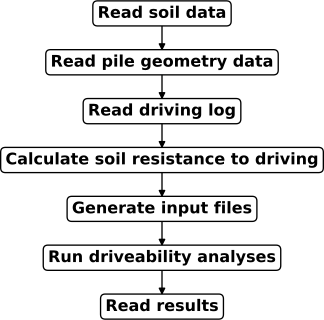
All the tasks rely on the global data object, such that the data that is read in the three first tasks are available for calculating the soil resistance to driving i the fourth task, and preparing the program input in the fifth task. The last task returns a dictionary representation of the global data object. By running this workflow through Speckle, the input and output were automatically stored on the Speckle server for later post-processing.
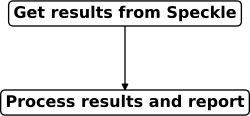
A separate workflow shown below was constructed for post-processing. The get_results()-function was used to restore the global data object from Speckle before creating interactive plots with Plotly and exporting to excel using Pandas.
All code was exchanged through Github and for convenience, the Python packages were made pip-installable through Github.
Benefits
Some of the benefits from adopting a workflow powered by Python and Caliber are:
More time spent adding value to the project instead of performing boring manual tasks!
Efficient collaboration by code exchange through Github and standardized setup in Caliber
Analysis runs performed in minutes instead of hours.
Quick iterations to validate calculations or explore design alternatives.
Full backlog of analysis results on the Speckle server.